On this page
Booking a call is only half the job: the call has to happen. This page explains what your bot and your team send around a booking (your next step), the three reminders, the one rule that decides whether a reminder to a lead can go, and the page each lead gets for their booking.
Reminders have no settings. They are built in, they are the same for every workspace, and they are about the call the lead asked for. They are never marketing.
What is sent, and when
| To | When | How |
|---|---|---|
| The host | When a call is booked, moved or cancelled | An email with a calendar file attached |
| The lead | Straight after they book or move in the chat | The confirmation, with a link to their booking (below) |
| The lead | When your team books, moves or cancels from the booking card | A message in the chat with the same link, if the messaging window is open (a cancel has no link) |
| The lead | 24 hours before the call | A message in the chat, if the messaging window is open |
| The lead | 60 minutes before the call | A message in the chat, if the messaging window is open |
| The host | 60 minutes before the call | An email |
A reminder whose time has already passed when the call is booked is never made. A call booked three hours ahead has no 24-hour reminder, and one booked forty minutes ahead has no reminders at all. A moved call gets fresh reminders for its new time, and a cancelled one gets none.
When a lead moves or cancels in the chat, the bot answers with a fixed confirmation. When your team books, moves or cancels from the booking card, the lead is sent a similar message, but only if they wrote in the last 24 hours and have not said stop (the booking card). In Safe mode the bot does not read a booked lead's move or cancel at all: it thanks them or passes the message to your team, who do it from the booking card.
Reminders are checked every five minutes, so one can arrive a few minutes after its time. A reminder that would be late is skipped rather than sent late: a 24-hour reminder that would arrive less than two hours before the call is not sent, and nothing is sent about a call that has already begun.
The lead's reminders, and the 24-hour window
The lead's reminders read like this:
- 24 hours before: "Hi Priya — a reminder that your screening call with (your business) is coming up: Wed 14 Oct, 3:00 pm IST. If you need to change it, just reply here."
- 60 minutes before: "Hi Priya — your screening call with (your business) starts in about an hour: Wed 14 Oct, 3:00 pm IST. If you can't make it, just reply here."
They come in the lead's language, with the time in your zone (and the lead's, if they named theirs). They are stored in the conversation like every other message the bot sends, so you see them there.
Why a reminder is skipped
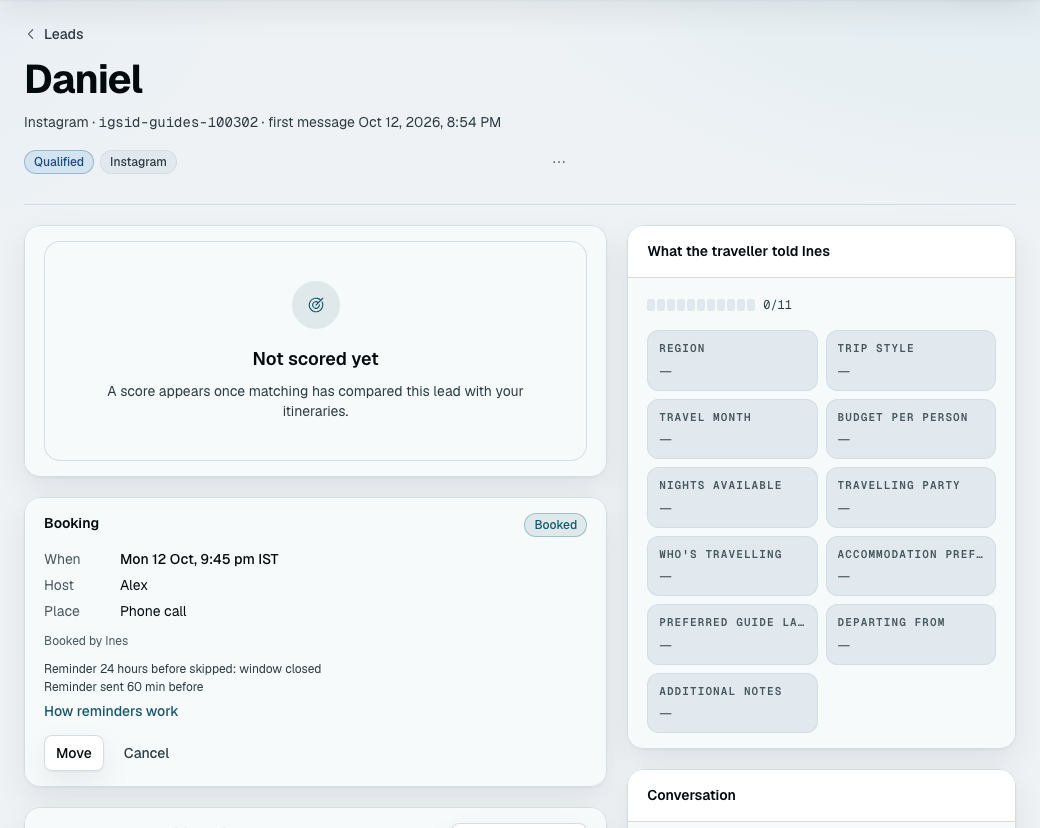
WhatsApp, Instagram and Messenger all let a business send a plain message only within 24 hours of the person's last message. Outside that window the platform refuses the message, and repeated refusals count against your account. So a reminder to a lead goes only while their window is open. When it is closed, the reminder is skipped, the booking card says "Reminder 24 hours before skipped: window closed", and nothing is sent. The same rule is why a follow-up is sometimes not sent.
This will be the usual case for a call booked days ahead: the lead's last message was the day they booked, so by the day before the call the window has closed. A lead who writes to you again in the meantime (even "thanks") reopens it, and the next reminder goes.
Two things cover the gap, and both are in the booking confirmation:
- The lead's own page has Add to calendar. The calendar file carries a one-hour alert, so the lead's phone reminds them whether or not we can. See the lead's page.
- The confirmation says "I'll remind you here if I can." It does not promise a reminder.
Messenger, Instagram and WhatsApp all work this way today: none gets a reminder outside the window (approved WhatsApp reminder templates are not available yet: below).
Other reasons a reminder is skipped
The booking card tells you what became of each reminder. Besides "window closed":
| The card says | What happened |
|---|---|
| "Reminder sent 60 min before" | It went |
| "Reminder due 24 hours before" | It has not fallen due yet |
| "…skipped: opted out" | The lead was closed as not interested, for example by saying stop; nobody who said that is messaged |
| "…skipped: no channel" | There is no conversation to send it in |
| "…skipped: late" | It would have arrived too close to the call, or the call has begun |
| "…failed: send failed" with a cause | The channel refused it. The cause is the same one shown under a message marked "Not delivered" |
| "Host reminder … skipped: host inactive" | The host has been deactivated, so no email is sent |
| "Host reminder … failed: email failed" | The email could not be sent |
| "…failed: error" or "…failed: interrupted" | Something went wrong on our side. It is not tried again |
A reminder is never sent twice, and never sent for a cancelled or moved booking.
The host's email
The person who takes the call is always emailed, and it is not a setting or a paid feature. They get an email when a call is:
- booked: "New booking: Screening call with Priya, Wed 14 Oct 3:00 pm IST";
- moved: "Moved: …" with the old time ("Was …");
- cancelled: "Cancelled: …".
Each email says who, when, where, which channel the lead came from, who booked it and has a link to the lead's page. When your bot booked the call, the line reads "Booked by the assistant (its name) on Priya's behalf". When your team did, it names the team member. A cancellation says who cancelled: the lead, in the chat, or your team. The time is in the host's own zone, with the business's time beside it when they differ. A WhatsApp lead's number is shown; an Instagram or Messenger lead shows the channel only. A host who has been deactivated is not emailed.
Calendar file. An invite.ics is attached, which Apple Calendar, Google Calendar and Outlook all
read. A move updates the same event on the host's calendar (it does not add a second one), and a
cancel removes it. It carries a 15-minute alert.
The 60-minute reminder is a short email to the host: "In 60 minutes: Screening call with Priya". It holds the time, place, channel and a link to the lead. It has no booking-page link and nothing the lead told the bot.
If you leave Settings → Notifications → Copy booking alerts to your alert addresses on, your alert addresses get a copy of the booked, moved and cancelled alerts (under your plan, like other alerts). The copy has no calendar file.
The page the lead gets
Every confirmation carries a link to the lead's own page for the booking. It shows:
- your business, and a badge: Booked, Cancelled or Ended;
- the call and who takes it ("Screening call with Asha");
- the time with its date and your zone named ("Wed 14 Oct 2026, 3:00 pm IST"), and "Your time" under it when the lead's browser is in a zone where the clock reads differently;
- how long it is, and where: "By phone", "At your address", the address for an in-person visit, and for a video call a Join the video call link when you gave a fixed one;
- Add to calendar: an Apple or Outlook file, a Google Calendar link, and Outlook on the web;
- "Need to change it? Reply in the chat."
It is read-only, so there is nothing a lead can break there; changes happen in the chat. It shows no lead name, number, address or answers.
- The link is private. It is a long random key, and anyone who has it can read the call's time, place and host. It stops working 7 days after the call.
- After a move, the old link stops working and the lead is sent a new one in the confirmation.
- A cancelled call's page says so and offers no calendar buttons; its calendar file removes the event. An ended call's page offers none either.
- Anything wrong with a link (mistyped, expired, moved) shows the same "not found" page.
- It is rate limited, to 30 requests a minute and 300 a day from one internet address (opening the page and downloading the calendar file both count). That is far more than a lead needs. Past it the page says "We couldn't load your booking. Reload the page to try again", and works again after a minute, or tomorrow if the daily limit was reached.
Reminder templates on WhatsApp: not available yet
WhatsApp can send a pre-approved message outside the 24-hour window. Your workspace does not use that today, so a reminder outside the window is skipped, as above. If it is ever added, it would be a short utility message approved by Meta, and Meta charges for each one, so it would not be switched on without your say-so. Messenger and Instagram have no such option.
If something goes wrong
| What you see | What it means |
|---|---|
| A reminder is skipped: window closed | Normal. The lead has not written in the last 24 hours. The lead's page and calendar file still remind them |
| The lead says they got no reminder | Check the card. Skipped for the window is the usual reason |
| The lead says their link does not work | It is more than 7 days past the call, or the call was moved. Their latest confirmation holds the right link |
| The host did not get the email | Check the address on their profile and their spam folder. A deactivated member is not emailed |
| A playground booking sent nothing | By design: playground bookings send no email and no reminders |