On this page
Until now, when a lead qualified, the next step was your team: someone read the alert and got in touch. Booking changes the last step of the conversation. Your bot offers the lead a few real times from your team's diaries, the lead taps one, and the call, visit or meeting is in the diary before anyone has typed a word. The person who takes it is emailed with a calendar invite, and the lead gets a link to add it to their own calendar.
It is off until you say yes, and it never blocks setup. Your bot works exactly as before, handing qualified leads to your team, until you turn booking on. Nothing is booked, and no lead is offered a time, before then.
Turning it on
You are asked once, in one of two places. They are two doors to the same switch.
- The card on your bot's to-do. After three real leads have qualified the dashboard shows "Let (your assistant) book calls?" (how the to-do works). Like every card it appears at the one-a-day pace.
- Business setup → Next step, at any time. When booking is off, press Let (your assistant) book calls, and the same form opens on the page. Opening it changes nothing: your choice is saved only when you press Yes, book calls, Use my booking page, or one of the buttons that turns it off.
Only an owner or an admin can answer. Everyone else sees the card with a note.
The form asks for what a template cannot know:
| You choose | What it means |
|---|---|
| The call | A name (such as "Screening call"), how long it lasts (10, 15, 20, 30, 45 or 60 minutes) and where it happens. Your template suggests one; nothing is applied until you say Yes |
| Who takes these calls | The team members the bot may book. Tick at least one; you are ticked to start with. Every ticked host needs weekly hours |
| Each host's week | The hours the bot may offer. They start from your opening hours, marked "From your opening hours — check them", or from Monday to Friday, 9 to 5, marked "Suggested — check these". A member who already set their own hours shows those. Each host can change theirs later (your hours) |
| Your time zone | The zone every time is shown in ("Times in"). It starts from your business's zone, or your browser's if the business has none. Press Change if it is wrong |
| Offer it | "When a lead qualifies" (the usual) or "Only when they ask" |
Then you have four answers:
- Yes, book calls. Booking is on. A toast says so, in the words of your setting ("offers times to leads who qualify", or "offers times when a lead asks to book" if you chose only when they ask), and offers Undo, which puts the choice back to "not chosen".
- Use my booking page. If you already take bookings on a page of your own, your bot sends that link instead of offering times (below).
- Not now. The card goes away for 14 days and comes back if it still applies.
- We'll get in touch ourselves. Booking stays off. You can turn it on later from Next step.
Booking is refused until it can work, and the form says which part is missing, in red:
| What you see | What to do |
|---|---|
| "Give the call a name." | Type one |
| "Add the address for in-person visits" | An in-person call needs your address |
| "Choose where it happens." | Pick phone, video, in person or the lead's address |
| "A video link must start with https:// and be a public web address." | Fix or empty the link (the call) |
| "Choose who takes these calls." | Tick at least one host |
| "Asha has no hours yet" | Add Asha's hours in the form, or ask Asha to add her own on Your account |
| "Choose your time zone." | Pick the zone you work in |
None of this stops your bot or your setup. It only stops booking being switched on half-finished.
The call
You have one call (one meeting type) to begin with. Where it happens is one of four:
| Place | What the lead is told | What the bot asks first |
|---|---|---|
| Phone | "We'll call you on" their number | On WhatsApp, nothing: it uses the number they wrote from. On Messenger or Instagram it uses the number they gave your contact question, or asks "What's the best number to call you on?" |
| Video call | Your fixed link if you gave one, else "(host) will send you the link" | Nothing |
| In person | Your address. If you gave none, the booking page says the host will meet them in person and to reply in the chat for the address | Nothing |
| At the lead's address | "We'll visit you at" their address. For site visits | The address, unless the lead already gave it (as a written answer to your location question or as a WhatsApp location pin) |
If the lead does not give the number or address, the bot asks a second time. After that it books the time anyway and tells the lead the host will confirm it with them.
A fixed video link follows the same rules as your booking page (below):
a public https:// address, because it goes to leads as your word too. Zoom, Google Meet, Teams and
Jitsi links are fine. It is given only once a time is booked. If a lead asks for it earlier, the bot
says it is sent with the confirmation, so nobody can collect a link meant for booked calls.
The one line your bot may say about the call ("a 20-minute phone call to talk through your trip") is yours to write. The bot describes the call with it and with nothing else.
The Next step page
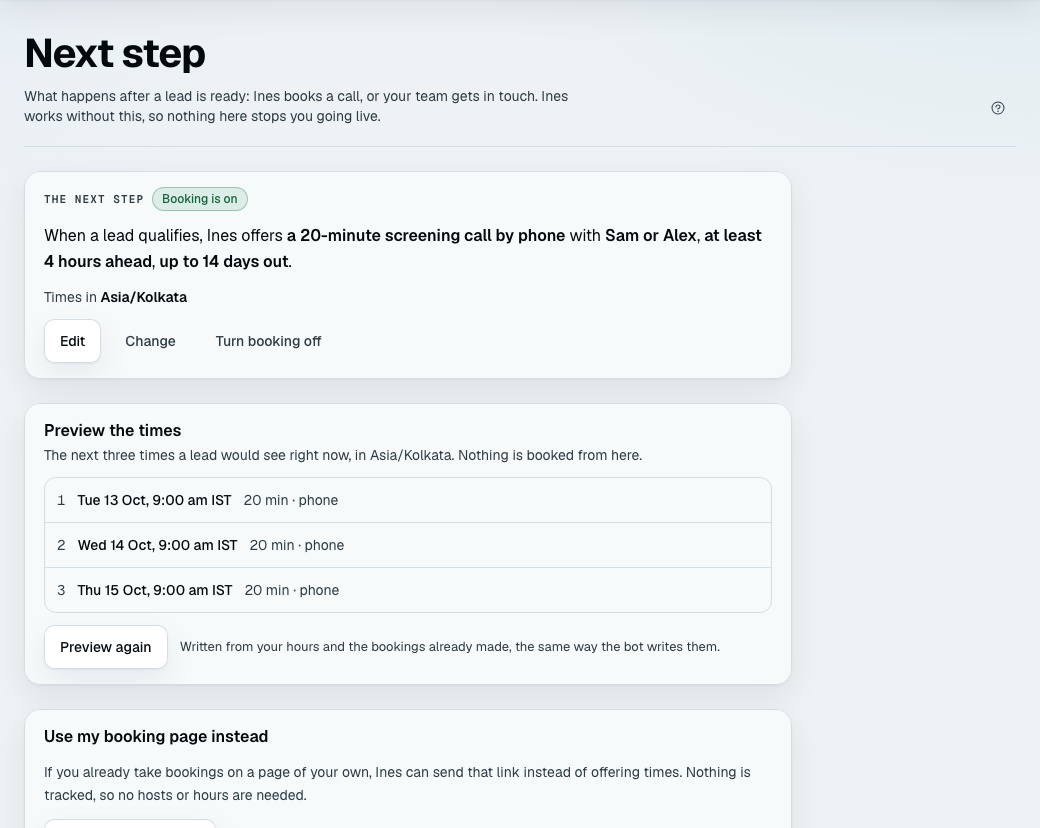
Business setup → Next step is where you see and change it afterwards. It reads as a sentence: "When a lead qualifies, (your assistant) offers a 20-minute screening call by phone with Asha or Ravi, at least 4 hours ahead, up to 14 days out."
-
Edit opens the full form. The first form, on the card or on the page, is the short one; Edit adds the line the bot may say, a fixed video link and More options.
-
More options hold the numbers that are already filled in. Change them only if they do not suit you:
Setting Starts at Range At least this much notice 4 hours 0 to 168 hours How far ahead 14 days 1 to 60 days Gap between calls 10 minutes 0 to 120 minutes Times are offered on a 15-minute grid, so a lead never sees 3:07. Even with the notice at 0 the soonest time offered is at least 15 minutes away, never one that is starting as the lead reads it.
-
Preview the times is a card lower on the page. It shows the next three times a lead would see right now, written from your hours and the bookings already made, with Preview again. Nothing is booked from the preview.
-
Turn booking off stops the bot offering times and hands each qualified lead to your team again. Times already booked stay booked, and your call and hours are kept, so you can turn it on again.
Two states are worth knowing. If booking is on but nothing can be booked (you removed the only host, or the only host's hours), the page says so, nothing is offered to leads, and the form is open to fix it. If one host has no hours yet, the bot skips that host and still offers the others; a card on your to-do, "Asha has no hours yet", asks for them.
When times are offered
When a lead qualifies is the usual choice. If you also show options (how), the times come after the lead has chosen one, or after the bot has told them your team will put some together: a qualified lead with nothing on the shelf is still worth a call.
Only when they ask keeps the bot from offering times by itself. It offers them only after the lead has asked to book, schedule or call. A lead who never asks reaches your team as before.
When a lead asks to book part-way through the intake, your bot says it will share times once it has what it needs, and names no day or time. What it needs is every must-know question. Once those are answered, the bot stops asking the optional ones and sends the times (or your booking page) straight away, so a lead who asks for times, or asks again, is not kept waiting for questions you marked optional. The answers to those optional questions are not collected for that lead. A must-know question still open is asked first. So is an optional question that one of your Hard rules reads (a lead who would be turned away must be able to be), and one that a must-know question depends on. A lead who asks for times twice is not flagged as frustrated for that: the times are the answer.
This applies when you offer times at "When a lead qualifies" or only when they ask. It does not apply while Safe mode is on or the lead may be a minor, nor when you also show options and those come first. A lead who has already finished the intake and been handed to your team, and who asks to book later, is the team's: the bot has stopped talking by then, so the message shows under Needs you as "Replied, unanswered" and you book from the booking card.
Some templates ask a "when" question, such as "How soon do you need it?" or "Preferred times". While times will be offered when a lead qualifies, the bot does not ask a question that only the booking answers. It fills the answer from the time the lead picks: a text answer gets the time in words ("Wed 14 Oct, 3:00 pm IST"), and a number (such as "days until we can see you") gets the whole days from today, or nothing if your own minimum or maximum for that question would refuse it. If the call is moved, the answer moves with it; if it is cancelled, the answer is taken away again. An answer the lead gave themselves is never replaced. Today the Clinics and Home services templates mark such a question. The bot still asks it:
- When it is a choice between options. Those are always asked, and so is any question one of your rules reads.
- When times are offered only on request, or you use your own booking page. Nothing is certain to be booked then, so nothing is skipped.
A lead who declines the times leaves the question empty, and your team asks.
What the lead sees
The lead's side is the same on every channel in what it says and different in how it is drawn. The times are always in your time zone, with the zone named: "Wed 14 Oct, 3:00 pm IST". Every word of a time comes from the product, never from the AI, so a time can only be one that is really free. The words are in the lead's language.
Which times, and how many. Each message offers up to three times. The first is never sooner than your notice, nor than 15 minutes from now, and starts on a quarter hour of your clock. Normally the three are the earliest free time on each of the next three days that have one, so the lead sees a spread of days (fewer if fewer days are free). When the lead asks for one particular day, the three are spread across that day: the earliest, the latest and one between, at least 30 minutes apart.
How the zone is named. The name is the short one the server's time data gives for that date: "IST" for Kolkata, "BST" in summer and "GMT" in winter for London, "EDT" or "EST" for New York. Where the data has no short name, only an offset such as GMT+9, the name is the city: "Tokyo time". The name follows daylight saving. When the times in one message fall either side of a clock change, the first line names your city ("London time") and each time keeps its own name.
WhatsApp shows a list. The message reads "Here are a few times for your screening call (20 min), in IST:". A button, See times, opens the list: the times, each with a line under it ("20 min · by phone"), and Another time as the last row. The footer says "Tap a time, or reply with its number."
Messenger and Instagram show the same words as numbered text, with a quick-reply button for each time and for "Another time".
Anywhere a list or a button cannot be sent, the lead gets the numbered text and replies with a number.
If the lead has already said when suits them, the first times are in that window. A lead who answered your "when" question with "weekday evenings", or said something like it while chatting, is offered evening times on weekdays: "Here are a few times in the evening, in IST:". When none is free then, the message says so ("Nothing's free in the evening, the nearest times are:") and gives the nearest. The bot reads what the lead wrote in the chat, not only what it recorded: parts of the day (morning is 8 am to noon, afternoon noon to 5 pm, evening 5 to 9 pm), weekdays, weekends, "after 5", "early", "before work", "after lunch" and "after school", in English, and the words for morning, afternoon, evening and the weekdays in the other languages the bot speaks. Only a sentence about a meeting counts ("evenings work best for us"), never a greeting ("good evening") or what they cannot do ("I can't do mornings"). A month leaves the first times as the earliest free ones. A week named in those messages ("next week works") holds for the first times and for every list after it.
Then one of these happens:
- They tap a time, or reply with its number. The call is booked at once, and no AI reply is spent. The confirmation reads: "All set, Priya! Your screening call with Asha is booked for Wed 14 Oct, 3:00 pm IST (20 minutes). We'll call you on +91…. Your booking page, where you can add it to your calendar: (a link). Reply here if you need to move it." followed by "I'll remind you here if I can." The link opens the lead's own page for the booking (reminders). When the lead chose a record that lists how it meets people (a practitioner who works only by video, a tutor who teaches only online) and that is not how the meeting type is held, the times, the confirmation and the page say how that record meets people instead, and the host sends the link or confirms the place.
- They write a bare time. "10?", "3pm?" or "how about 4:30?" while times are on offer is a request, not a question about your opening hours: the lead gets the earliest free times from that hour on, on the next days. A bare hour from 1 to 7 is taken as the afternoon (3 means 3 pm), and a question mark is never a yes, so nothing is booked. A number that is a place in the list ("2?" when three times are on offer) is read as a pick of that place, and a number that is not an hour ("20?") is not read as a time.
- They write what they want. "Can we do Thursday evening instead?" gets the free times that evening. If nothing is free then, the bot says so and offers the nearest: "Nothing's free on Thursday evening — the nearest times (in IST) are:". Tapping Another time, or writing "any other day?", is asked about once ("Which day and time of day would suit you best?"); asked again, the lead gets the next times after the last ones. A typed "the second one" or "Thursday at 3 works" books it, as a tap does. Reading what the lead typed uses one AI reply.
- A day typed is read as the lead means it. "Thursday works" books the one Thursday time only while the times are the bot's last message and Thursday is in them. A day named after "Which day and time of day would suit you best?" is never booked straight away: the lead gets new times on that day and picks one. A day or part of the day that no listed time is on gets new times too.
- They name a week. "Next week then" is asked which day suits, and the bot remembers the week, so the "Tuesday morning" that follows gets next week's Tuesday morning. "This Tuesday" is this week's (or the coming one, once it has passed), "next Tuesday" is next week's, and a plain "Tuesday" is its next one (today, if it is a Tuesday: see the next point). Weeks run Monday to Sunday, in the lead's own time zone when they gave one. Once a week is named, every later list stays inside it; if nothing is free in that week, the bot says so before it offers the nearest times. The week is read in English only. In another language it is not remembered, but a day named after the question still gets new times, never a booking.
- A weekday that is today. "Monday at 10" is read as 10:00 or later. A lead who writes it on a Monday means today while some time from 10:00 on can still be booked after your minimum notice, and next Monday when none can. The message of times and the confirmation always name the date ("on 12 Oct" in the first, "Mon 12 Oct" or "Mon 19 Oct" in the second), so the lead sees which Monday they got. Any other weekday is its next one. If nothing is free then, the lead is told and offered the nearest times.
- They say where they are. Once times are on offer, "I'm in London" makes every later time show both clocks: "Wed 14 Oct, 3:00 pm IST (10:30 am London)". A zone mentioned earlier, during the questions, is not picked up. If they also say what suits them on their own clock ("tomorrow after 3 pm my time"), the first line says whose clock the words are on: "Here are a few times tomorrow after 3:00 pm (London time), in IST:". Only a full zone name (Europe/London, UTC or GMT) is kept as the lead's zone. An abbreviation like "IST" or "BST" can mean different places, so it is ignored and the times stay in yours.
- They ask a question about the call ("how long is it, and is it on Zoom?"). The bot answers from the call you described and your facts, and nothing more.
- Someone else takes the same time first. The lead hears "Sorry, that time has just gone" and gets three new times. Two leads can never hold one host at the same time.
- They say no ("not now, thanks"). The bot accepts it warmly and says it will pass this to the team. The lead shows under Needs you with the reason "Didn't book a time".
- They go quiet. After your usual wait for a quiet lead, the bot asks once, "Would one of those times work for you?", however many nudges you allow. If there is still no answer after another wait, or the lead's 24-hour window has closed, the lead shows under Needs you as "Didn't book a time".
A lead is offered at most four messages of times. After that, or when no time is free within your "how far ahead" limit, the bot says your team will arrange one. The lead shows under Needs you as "Didn't book a time", and your alert says why ("No time suited", or "No free time in the next 14 days").
Which host
The bot chooses among the hosts who are free at that time: whoever has the fewest bookings in the next seven days. When that is equal, it is always the same one of them, not alphabetical and not random. The confirmation names the host by first name.
After the booking
Once a lead is booked, the bot answers only what a receptionist would:
- "Can we move it?" The bot offers three new times under the same rules, in the window the lead named if they named one, and the lead's pick moves the call. The old time is cancelled, the host gets one "moved" email, and the reminders move with it. "Actually, keep Tuesday" keeps the old time. The bot moves a call at most three times. After that, or when nothing is free, or when booking has been turned off, or once four messages of times have gone out for the enquiry, it tells the lead it has asked your team to arrange a new time, and the call stays where it is until then. A move the lead does not finish changes nothing and sends nothing.
- "I need to cancel." (A lone "cancel" counts too; it is never read as "stop messaging me".) The bot cancels it, tells the lead it is done and asks which day would suit them if they want another time ("If you'd like another time, just tell me which day suits you"). The host is told. The bot offers no times until the lead names a day, and it does not chase: if the lead stays quiet, they show under Needs you as "Didn't book a time" when the next follow-up would have been due, with nothing sent. A question about cancelling ("can I cancel if something comes up?") is answered, not acted on. A call that has already started is never cancelled or moved by the bot.
- A question about the call, answered from the call and your facts.
- "Thanks!" gets a fixed reply: "You're welcome, Priya! See you Wed 14 Oct, 3:00 pm IST."
- Anything else is passed on ("Thanks. I've passed your message to the team, and they'll pick it up from here."), and the lead shows under Needs you as "Replied, unanswered".
In Safe mode the bot reads none of this. A booked lead who says thanks gets the thank-you; anything else, a move or a cancel included, is passed on to your team, who do it from the booking card. No follow-ups are sent to a booked lead.
What your team sees
- The host is emailed, always: when a call is booked, moved or cancelled (a member who has been
deactivated is not). The email says who the lead is, when (in the host's own zone, and yours when they
differ), where, which channel they came from, and who booked it. When your bot booked it, that line
reads "Booked by the assistant (its name) on Priya's behalf", so nobody mistakes it for a colleague.
The host's email also links to the lead. A calendar file,
invite.ics, is attached, so it lands in Apple, Google or Outlook calendars. A move updates the same event instead of adding a second one. This is not a setting and does not need a paid feature (the email). - Your alert addresses get a copy unless you switch it off: Settings → Notifications → Copy booking alerts to your alert addresses. Copies follow your plan, like every alert.
- The lead shows "Meeting booked" in their thread. It is a note, not a request: it never counts under Needs you. The "Qualified" note and the alert still arrive as before.
- Bookings is a page of its own in the sidebar, after Leads (below).
- The booking card sits on the lead's page and in the inbox (below).
- Bookings on Analytics counts booked, completed, cancelled and no-show calls, and how many were won afterwards (reading your analytics).
The Bookings page
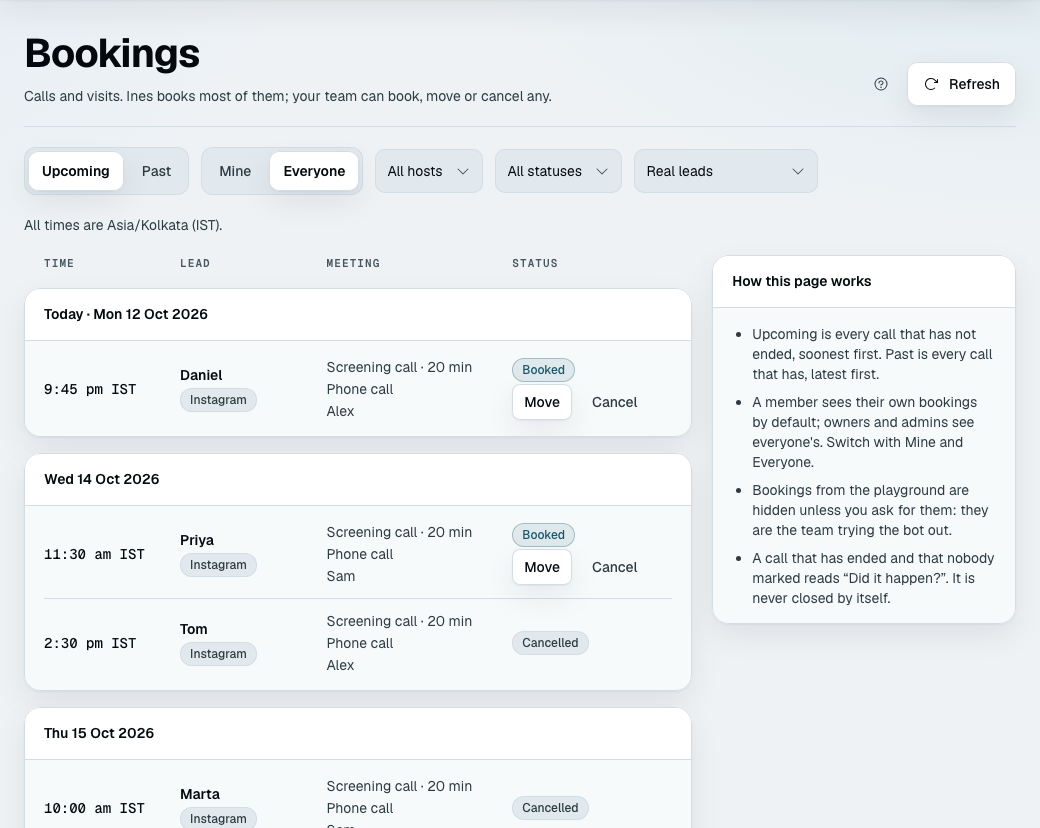
Bookings lists every call and visit, by day, in your time zone. Upcoming is every call that has not ended, soonest first; Past is every call that has, latest first. A cancelled call stays in the list with the status Cancelled. The list shows 20 at a time, with the count and page buttons underneath. Each row shows the time, the lead (a link to their page), the call and how long, the place, the host, the status, and who booked it.
- Mine and Everyone. A member starts on their own bookings; owners and admins start on everyone's.
- Filters narrow by host (when you are on Everyone) and by status: Booked, Completed, No-show or Cancelled. Clear filters puts them back.
- Playground bookings are hidden unless you ask for them under Real or playground bookings. They are your team trying the bot out, and each is marked "Playground".
- Two zones. If your browser is in another zone than the business's, each row shows the business's time first and yours underneath, both named. A workspace with no time zone shows your browser's.
- "Did it happen?" A call that has ended and that nobody marked shows two buttons: Completed and No-show. Nothing closes it by itself.
The booking card
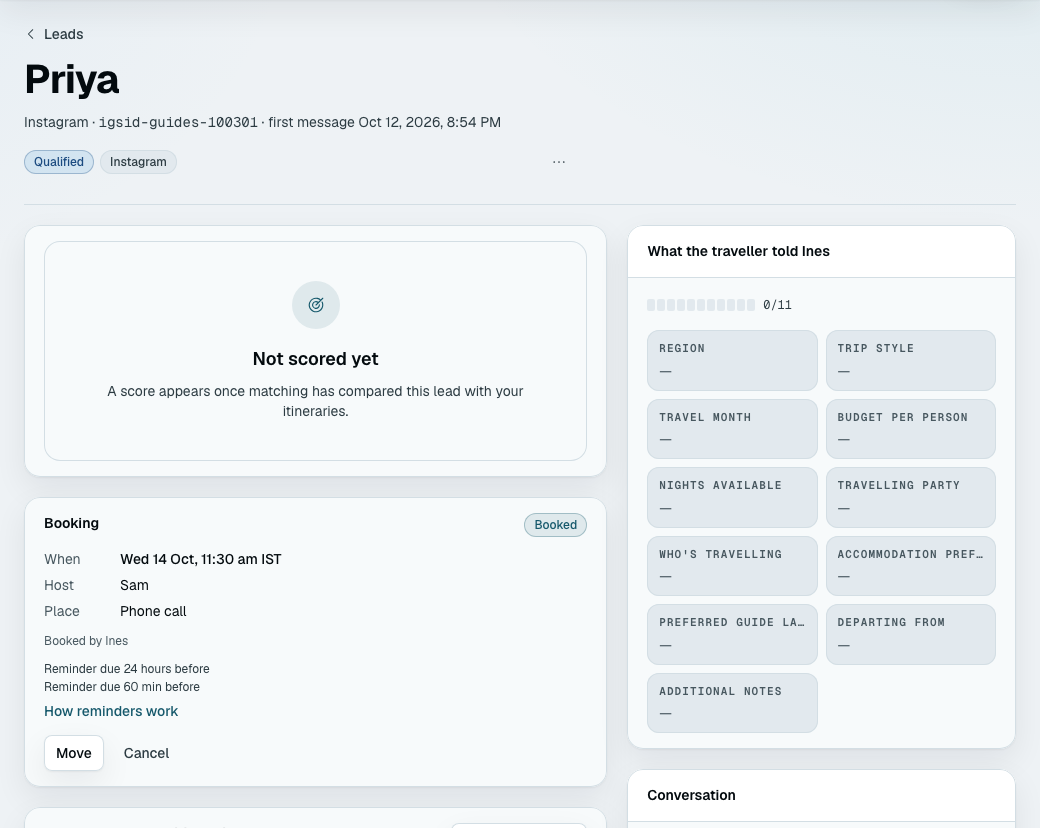
On a lead's page, the Booking card shows the call: when (and the lead's time, if they named a zone), the host, the place, the status, who booked it and what became of each reminder. Any member can use it, whether the bot booked the call or not.
- Book a time (a lead with no call coming up; otherwise use Move): a dialog shows the next free times, More times, and Pick any time, with a choice of host ("Anyone who is free"). Picking any time can be outside the host's hours, and the dialog says so; it can never overlap another booking. This is also the way to book a lead the bot held for your team.
- Move and Cancel work until the call ends. Cancel asks first, with an optional reason that only your team sees: it is never sent to the lead.
- Completed and No-show work once the call has ended. No-show asks first, because it puts the lead under Needs you with the reason "Didn't book a time", so someone follows up.
- The lead is told only when we can message them. If they last wrote more than 24 hours ago, the dialog says "(name) last wrote 30 hours ago — we can't message them; let them know another way". The booking is still made, and afterwards the screen says whether the lead was told. A lead who said stop is not messaged either. See why a follow-up was not sent for the 24-hour window.
- A team action never changes the lead's stage and never pauses the bot.
If you already have a booking page
If you take bookings on a page of your own, choose Use my booking page on the card or on Next step and paste its address. The bot then sends "You can pick a time that suits you here: (your link)" to a qualified lead, instead of offering times.
- The address must be a public page that starts with
https://, at most 500 characters. Do not paste a link with a private token in it: your team can read the address, and your bot sends it to every qualified lead. - What is refused, because your bot sends the address to every qualified lead as your word. The
form says "Use a full link that starts with https:// and is a public web address". Refused are:
- a port (
cal.example.com:8443; the standard:443is fine); - a name that only works inside a network:
localhostand anything under it,.local,.internal,.lan,.home.arpaand similar; - a name that ends in a dot, has an empty part (
calendly..com), or has no dot at all; - a number in place of a name (
10.0.0.1), or a user name and password in front of the name (me:secret@cal.example.com); - a name written with non-English letters (
bücher.example.com, or a Cyrillic "а" that looks like an English "a"). If your page really is one, paste itsxn--form, which your browser's address bar shows; - any invisible or direction-changing character, such as a zero-width space. If you copied the link from a chat or a document and it is refused for no reason you can see, type it again.
- a port (
- Nothing is tracked. A lead who books on your page is not in Bookings, and there are no reminders from us. Your own booking tool sends its own.
- No hosts or hours are needed, so nothing here can be "not ready".
- The lead still reaches your team as usual. They show as qualified and waiting, as before.
- To go back to times, press Edit on Next step, choose the hosts and their hours, and save. Saving the form replaces the link. The call, hosts and hours you had before are kept until then.
When the bot never books
Your bot offers no times to a lead, and the lead reaches your team as it always has, when:
- booking is off, or nothing can be booked;
- the workspace has no time zone;
- the lead was turned away by your rules;
- the lead is held for your team's decision;
- the bot is paused, or a person has taken over the conversation;
- the lead asked for a person, made a complaint, asked for support, was abusive, or sounds frustrated;
- the lead reported an emergency, or may be a minor (these stay in force until a person hands the conversation back);
- Safe mode is on (what it does);
- the lead said no to the next step;
- the lead last wrote more than 24 hours ago when the times would go out, because a plain message cannot be sent then. Your team books from the card.
A tap or a number on times already offered still books in Safe mode, because it is read by code, not by the AI. In Safe mode a typed reply is not read: the lead is pointed back at the times ("Which of those times suits you? Reply with its number."). Any other reason above that arises after the times went out (the bot paused, a complaint, an emergency, booking switched off) means a tap is not booked: the lead goes to your team without a word, and the message is the team's.
If the only host was deactivated, or lost their hours, after the times went out, a tap on one of them is not booked either. The lead is told "The team will arrange one with you and be in touch shortly" and shows under Needs you as "Didn't book a time" (not as "Replied, unanswered"). With more than one host, the host who is still free takes the booking, or the lead is offered new times. Your team can book any lead by hand from the card, whatever the reason.
Trying it
The playground books for real, safely. Finish the intake as a lead who qualifies, tap a time, and the side panel shows "Booked: Tue 13 Oct, 3:00 pm IST with Asha (playground — nobody is told)".
- A playground booking is checked against your real bookings, so it cannot take a host's real time, and two playground leads cannot take the same time either. It never blocks a real lead.
- It sends no email and no reminder, and nothing reaches a person.
- It is hidden on Bookings unless you ask for it, and it is not counted on Analytics.
- Start over deletes the rehearsal's bookings, so a rehearsal never holds your team's time.
- The public demo on the website books too; its bookings never block one another.
If something goes wrong
| What you see | What it means |
|---|---|
| The bot offered nothing and the lead reached the team | One of the reasons under when the bot never books, or no host had a free time in the next days |
| "Booking is on, but nothing can be booked" on Next step | The only host was removed or has no hours. Choose a host and save their hours |
| "(name) has no hours yet" | That host is skipped. Add their hours on Next step, or they add their own on Your account |
| The preview says "No free time in the next few weeks" | Check each host's hours, and the notice and days ahead under More options |
| A booked time is in the wrong zone | Check the zone on Next step, and each host's own zone (your hours) |
| The zone reads "Tokyo time" instead of an abbreviation | Normal for a zone with no common short name (how the zone is named) |
| The lead said where they are and times still show one clock | A zone said before the times were offered is not picked up, and neither is an abbreviation such as "IST". Once times are on offer, "I'm in London" works |
| "Sorry, that time has just gone" | Two leads wanted one time; the other was first. Nothing to fix |
| The lead was not told about a move | They last wrote more than 24 hours ago. Let them know another way |