On this page
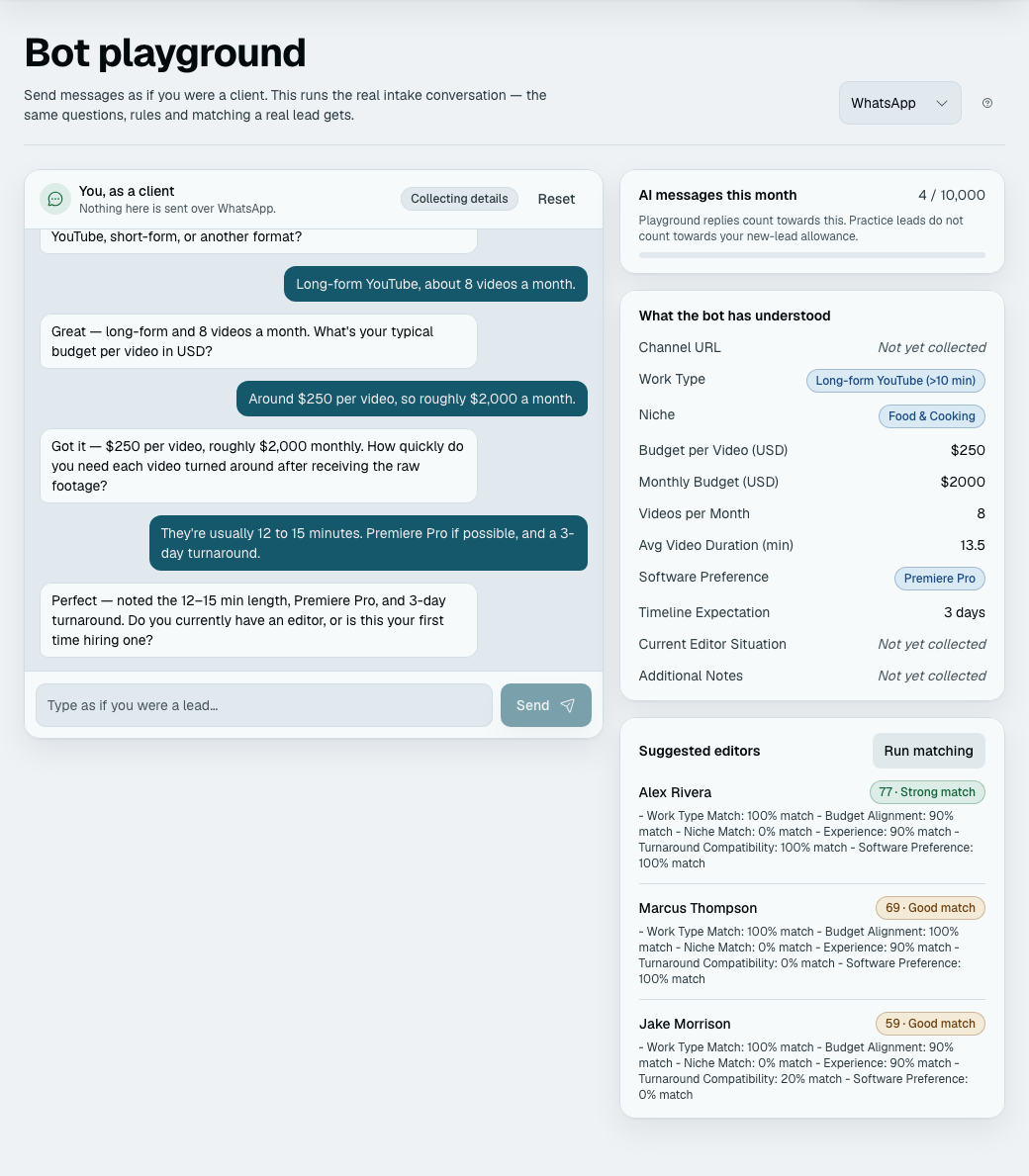
The playground puts you on the customer's side of the conversation. You type what a lead would type; your bot answers exactly as it would answer them.
It runs the real pipeline, not a demo. The same intake, the same questions, the same qualification rules, the same matching. That is the entire value of it — what you see is what your customer gets.
You find it under Playground in the app. A Channel picker at the top (WhatsApp to begin with) lets you rehearse on any channel, connected or not, and each channel keeps its own conversation. Quick start's Try your bot step shows only the chat, on WhatsApp, with a link to this page.
There is also a public version at /try, which anyone can use without signing in. It is the same page running the same intake, but on a chosen industry's questions rather than your workspace's, and it matches against example records made up from the visitor's own conversation — wherever they are and whatever they asked for. A visitor has a limited number of messages (twenty to a visit, to begin with), and an industry that suggests a call can book a time on a demo calendar. Your questions, your records and your rules are not in it. Use it to show somebody what the product does; use this one to check what yours does.
When nothing of yours matches
Matching runs on its own in the playground when the lead qualifies. (A lead held for your team is not matched by itself here: press Run matching now to see its closest options. A real lead is matched as it is held.) It scores your records first. If none of them fit — you have not added any yet, or none suit what you typed — and the lead qualified, the playground makes up three example records from the conversation instead, so you still see what a match looks like. They are labelled "Example" and scored against your matching weights like any other record.
Examples exist only for that playground conversation. They never appear in your records list, your counts or your plan's limits, a real lead is never matched against them, and starting a new conversation deletes them. A conversation that ends as not a fit gets no examples: the panel tells you which rules it missed instead.
What is switched off
Only the outside world:
- Nothing is sent over any channel. You do not need a connected channel to use the playground.
- No notifications are sent to your team.
- No follow-up messages are scheduled.
- The conversation does not count as a lead against your plan.
What is not switched off
AI replies are real model calls, and they count towards your plan's AI reply allowance. The bot is genuinely thinking about what you typed; there is no cached script to give you instead. Long exploratory sessions spend the same allowance real conversations do, and the panel shows "AI replies this month" against your plan. When the allowance is spent the bot stops replying and the conversation is handed to a person, as it would be for a real lead (Plans, limits and meters). Tapping an option or a time costs nothing.
Playground leads never pollute your numbers
Simulated leads are excluded from every figure on the analytics screens — volume, the funnel, outcomes, and every "average days to" measure. That last one matters more than it sounds: a playground lead is qualified in about ninety seconds, and counting them would drag your average time-to-qualify towards zero and quietly make your reporting useless.
They are also excluded from the "can I still switch template" check, so trying your bot never costs you that option.
One conversation each
Every team member gets their own playground conversation on each channel. Two people can test at the same time without colliding, and neither can reach the other's — the conversation belongs to whoever started it.
Start over gives you a clean slate; the previous conversation is archived rather than deleted, and it never appears in your leads or your numbers. Starting over also deletes the example records and the rehearsal booking that conversation made.
Finish intake now
A real lead who stops replying after the required answers is finished by a timer (30 minutes by default, a setting on the Settings page). In the playground you do not have to wait. Finish intake now in the side panel treats the optional questions still open as declined and reaches the verdict at once, so you can see the outcome without answering everything. It works only once every must-know question is answered, and only an owner or admin can use it.
What the side panel shows
The side panel (under the chat on a narrow screen) has, top to bottom: What the bot has understood (each question, filled in as the lead answers), What the bot decided, the booking, A lead who comes back and the Suggested records, then the AI-replies meter.
What the bot decided shows the verdict as it would stand if the lead stopped now: qualified, held for your team, or not a fit. It lists each rule the lead has missed, tagged Hard or Negotiable. A rule you have not marked yet counts as negotiable, and the panel says so. For a negotiable rule it also shows the negotiation so far, one line per step: the limit stated, what the lead said about flexibility, each offer and how the lead took it, and the team check.
If options are on, a lead who qualifies is shown them here too, as a card of rows you can press, so you can choose one yourself or press None of these; a press costs no AI reply. Nothing is sent over any channel and no one is alerted. Only your real records are shown, by name and the fields you made visible; a sample record or a made-up example never is, so with only samples the playground has nothing to offer (Showing options to leads).
If booking is on, a lead who qualifies is offered times here too, as a card of rows you can press, and a press books that time (no AI reply is spent). The side panel then shows A call the bot booked: "Booked: Tue 13 Oct, 3:00 pm IST with Asha (playground — nobody is told)", and the times the bot offered, with the one taken marked. It is a real booking against your real diary, so two playground leads cannot take one time, but it is marked as a rehearsal: no email, no reminder, nothing reaches a person, and it is hidden on Bookings unless you ask for it. Start over removes it (Your next step).
A lead who comes back (owners and admins) has Come back later: it makes the lead go quiet for longer than the welcome-back gap, so your next message is a return and you can read the welcome back.
Try a hard bargainer sits above the message box. It sends three ready-made messages from a lead who will not budge, one per tap, so you can watch what your bot offers (what it may offer). The messages cost nothing to write, but the bot's answer to each uses one AI reply, like any you type.
What to try
- Answer normally. Confirm the questions are the ones you meant to ask.
- Answer badly. Reply "it depends" to a required question and watch what the bot does — this is how you find a question that needs a prompt hint.
- Be a lead who misses a rule. Give a budget under your floor, and watch the bot state the limit and ask about flexibility. Say no to flexibility and see which offer it makes first. Then miss two hard rules and read the goodbye the customer would receive. It goes out in your name.
- Choose an option. With options on, finish the intake as a lead who fits and see what the lead would read. Check that every field shown is one you meant to show, then choose one and read the confirmation the lead would get. Try None of these with a reason too.
- Book a time. With booking on, finish the intake as a lead who qualifies, tap a time, then try "can we do Thursday evening instead?" and see which times come back and in which zone.
- Finish it. Check the matches at the end are the records you would have picked yourself. If they are all labelled "Example", none of your records fit: that is worth knowing before a customer finds it out.
Every one of those is a configuration change you would otherwise have discovered from a real customer.