On this page
Your plan sets six limits. They come in two kinds, and the difference decides whether deleting something gives you room back.
Metered limits
New leads, AI replies, matching runs.
These accumulate through a monthly window and reset when it rolls over. Spending is permanent inside the window — deleting a lead does not give back the allowance it used, because the work was already done. If the person behind a deleted lead writes in again, they are a new lead and use a new one. The one exception is a matching run that could not start: it is given back.
- A new lead is a new person writing in on a channel. A lead who is already in your list costs nothing more, however long the conversation runs. Conversations in the playground do not use this allowance.
- An AI reply is one reply the bot writes. It reads a lead's message and writes its reply in two AI calls (and may ask for a second draft if the first said something it could not support), and the meter counts the reply, not the calls (how a reply is made). A follow-up message the AI writes to a quiet lead uses one too; when none are left, the follow-up goes out in fixed wording instead. Replies the bot gives from fixed wording use none: the emergency reply (which still goes out when your replies are spent) and a tap on an option or a time. Neither does a message the bot does not answer, because a person has the conversation or it has ended. Talking to your bot in the playground does use AI replies, like any conversation.
- A matching run is one matching of a lead against your records, started by the bot after a lead qualifies (when automatic matching is on) or by your team.
The window is monthly even on an annual plan. An annual subscription is a billing arrangement; the meters still run in one-month periods from your subscription's start date. So a plan's "per month" figure means per month, on every plan. Subscribing starts a fresh window from that day. On a trial the usage card shows no reset date, only that the counts run through the trial and subscribing starts a fresh month.
Live-counted limits
Team members, your own records, connected channels.
These are not a running total — they are a count of what exists right now. Removing something frees its slot immediately, with no waiting and no reset.
A few details follow from that:
- A pending invitation holds a team seat. Otherwise you could send ten invitations on a three-seat plan and only find the limit as the fourth person tried to accept. Revoking an invitation frees the seat at once, and so does its expiring after seven days. A member you deactivate frees theirs.
- Deleted and deactivated records do not count. Deactivating is how this product takes a record out of the pool (deleting does the same), so it has to free the slot — otherwise a workspace at its limit could never make room without asking us. The example records the playground makes for a test lead do not count either.
- Sample records from your template do count, until you delete or deactivate them. They are ordinary records as far as the meter goes.
- A connected channel is one connection, not one platform. WhatsApp, Instagram and Messenger each take a slot of their own. Instagram and Messenger sharing a Facebook Page does not make them one channel — they are connected separately, receive separately, and count separately. Disconnecting one frees its slot at once (Connecting your channels).
What happens at a limit
An action you take, such as adding a record, inviting a member or running matching, is refused, with an explanation naming the limit you hit — not queued, not silently dropped, and never by deleting something else to make room. What happens when the limit is hit by a lead writing in is below.
The one worth understanding is new leads. If a message arrives from a new person once the lead allowance is spent, no lead is created and the message is not kept. The bot does not answer it, but the person gets one short courtesy reply saying you are at capacity and to try again soon. You can word that reply yourself in Admin → Settings, under Reply when your lead allowance is used up. People who are already leads are not affected, and you will see the new-leads meter full on the Billing page.
AI replies work differently. When the month's AI replies run out, the bot pauses the conversation it was about to answer and hands it to your team as "AI allowance used up" under Needs you. Its message is stored, and you answer it yourself. If your plan includes email and WhatsApp alerts, your team is also told; otherwise Needs you and the Billing page are where you will see it (when the bot stays quiet).
A matching run past the limit is refused. A lead who qualified stays qualified and waits for your team to match them by hand.
Nothing at a limit ever destroys data. Reaching a limit stops the product doing more work; it never undoes work already done.
Features that depend on the plan
Two features come with the plan rather than being counted. The full analytics suite is the trend reports in Reading your analytics; the basic overview is on every plan. Email and WhatsApp alerts to your team come with the plans that include them. The pricing page says which plan has what.
Seeing where you are
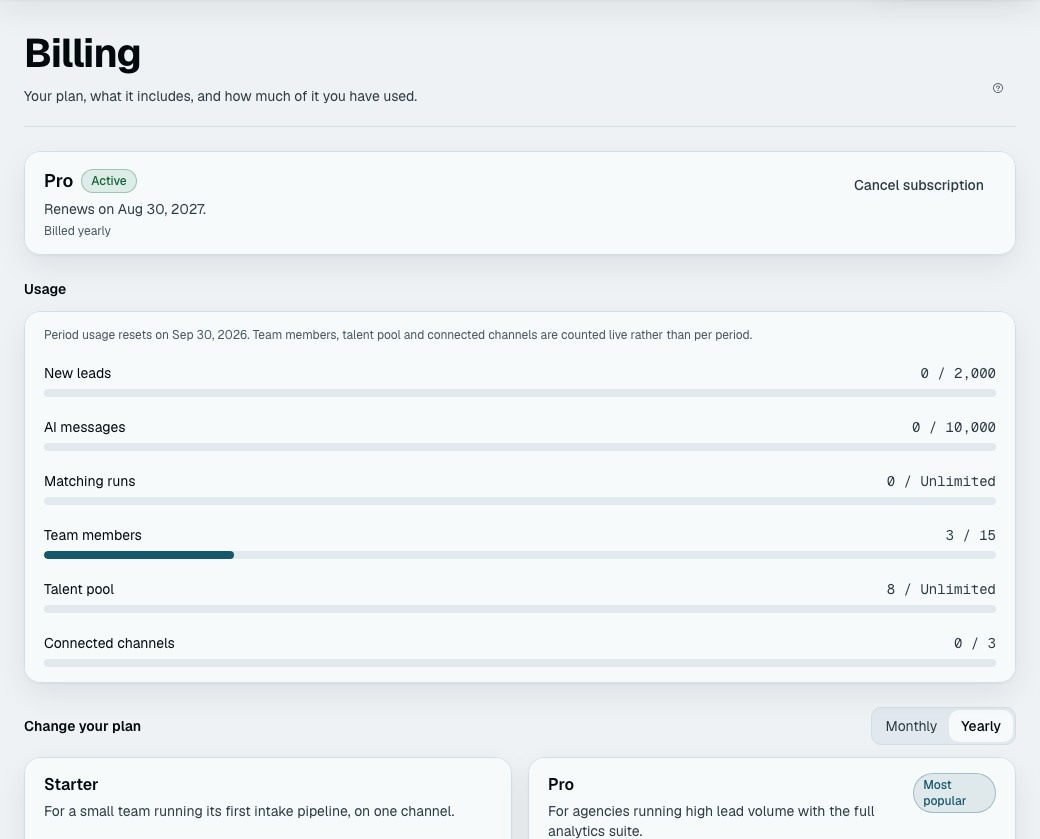
Admin → Billing shows every limit against your current usage, and the date the metered window resets. Everyone on the team can see this, not only the owner. Each limit has a tile (New leads, AI replies, Matching runs, Team members, your records under their own name, and Connected channels). A tile turns amber from 80% and red when everything the plan allows is used, and an unlimited one just shows what you have used.
The numbers themselves
On the pricing page, which is generated from the same registry the platform enforces. It is deliberately the only place they are written down — an article repeating them would be wrong the first time a plan changed, and would look authoritative while it was.