On this page
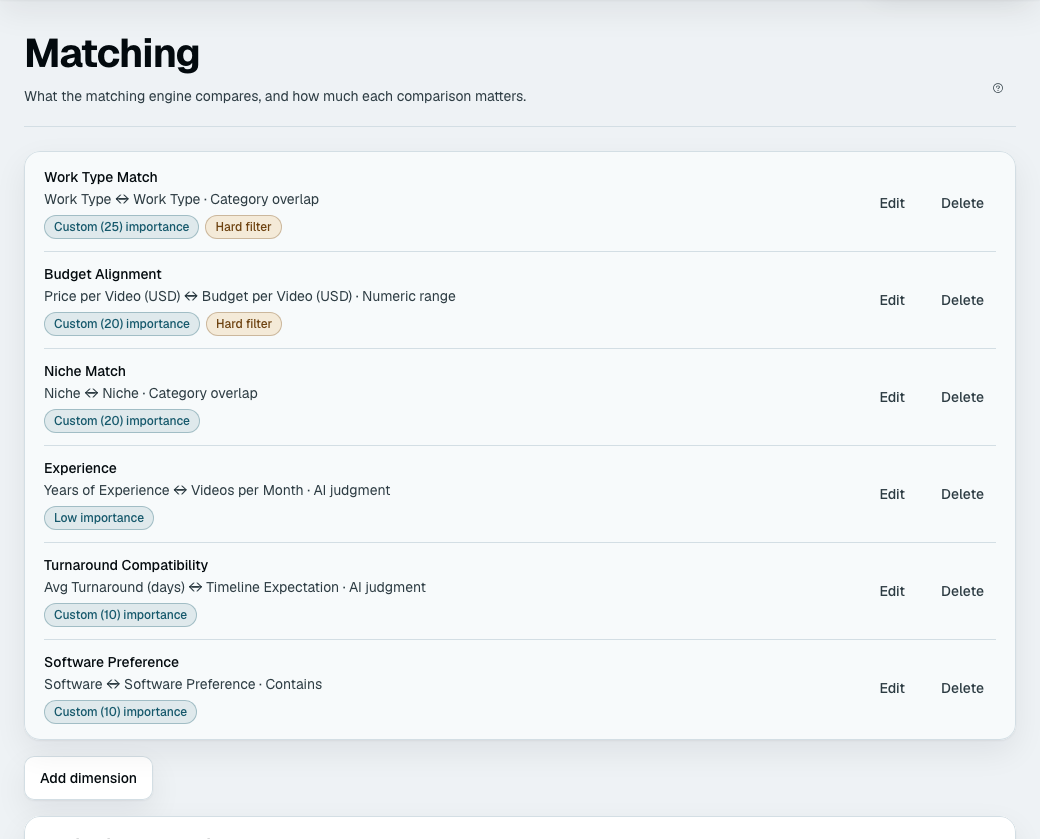
Once a lead has finished the intake, the platform scores your own records against them and shows your team the best few. That includes a lead held for your team for missing a rule: it gets matches straight away, so you can see whether a different record would win them. A lead closed as not a fit is not matched; Reconsider it and matching runs. Matching starts by itself when Match as soon as a lead is ready is on under Admin → Settings; when it is off, someone presses Run matching on the lead. A matching dimension is one comparison in that score: one field on your records, one answer from the lead, and a way of comparing them. You set them at Business setup → Matching.
Building a dimension
Choose Add a dimension (or Edit dimension on an existing one). The form asks for:
| Setting | What it is |
|---|---|
| Name | What this comparison is called, in your words |
| Record detail | The detail on your own records to compare with (the form puts your record's name first: "Trip detail", "Tutor detail", "Property detail") |
| Question | The question whose answer the lead gives |
| How to compare them | The match type |
| Importance | How much this comparison counts |
| Hard filter | Whether failing it removes the record entirely |
A question you have switched off is not collected, so a dimension that uses it is not scored. A photo field cannot be used: photos are for showing a record to a lead, not for scoring.
The match types
| On screen | Compares | Scores 1 when |
|---|---|---|
Exact match (EXACT) | Two values | They are the same, ignoring case and spaces at the ends |
Contains (CONTAINS) | A record's list of values and the lead's one value | The list includes the lead's value, ignoring case |
Numeric range (RANGE) | Two numbers | The record's number is at or just under the lead's. It falls off as the record goes over |
Category overlap (CATEGORY_OVERLAP) | Two tag lists | Every one of the lead's tags is also on the record. Otherwise the score is the share that is |
AI judgment (CUSTOM_LLM) | Anything | The model judges the fit and explains itself |
When either side is missing, the dimension scores 0.5 — the middle. Not zero. A record that has not filled in a field is unknown, not unsuitable, and scoring it zero would bury every incomplete record beneath every complete one regardless of fit.
Numeric range is directional. It divides the record's number by the lead's. A record at 80% of the lead's number or less scores 0.9, up to 100% scores 1, up to 10% over scores 0.85, up to 25% over 0.6, up to 50% over 0.3, and more than 50% over 0. So use it where lower is better for the lead, such as a price against a budget. Where more is better (a capacity against a party size), a bigger record counts as "over" and scores badly; compare those with another type.
How weights work
Weights are relative, not percentages. They are summed and each dimension takes its share, so weights of 3, 1 and 1 give the first dimension three-fifths of the score. You never have to make them add up to anything.
On the form you pick Importance: Low, Medium, High or Critical (weights of 15, 40, 70 and 95). Advanced: set an exact number takes any weight from 1 to 100, and the row then reads "Custom (25) importance". On the Matching page each dimension also has a slider, with the share of the score it gives that dimension beside it; move sliders and press Save weights. A chart, How a score is split, shows the shares.
The final score is out of 100. What moves it is the ratio between your weights — doubling every weight changes nothing at all.
A useful starting point: give the one thing you would never compromise on a weight several times larger than everything else, leave the rest equal, and adjust after you have watched a dozen real matches.
Hard filters
A hard filter is different in kind from a weight. A dimension marked as a hard filter removes a failing record from consideration entirely — it does not score badly, it is not there. Tick the Hard filter box on the form to turn it on.
Use one where the answer is genuinely disqualifying: outside the service area, unavailable on the date, does not hold the licence. Use a weight for everything else. Two hard filters that each rule out half your records leave you with a quarter of them, and the usual symptom of over-filtering is an empty matches list with no explanation.
A lead who missed a rule still sees the record
There is one softening. When the only filter a record fails is on an answer the lead already missed a qualification rule on, the record is kept and marked instead of dropped. A traveller whose budget missed your floor would otherwise see none of the trips that fail a budget filter, which is all of them, and your team would learn nothing about what could have won them.
Such a record is scored as usual and tagged on the match card with the dimension's name, for example Outside Budget Alignment, and the written reasoning names the gap plainly. Every other hard filter stays strict. Leads that missed no rule see no change.
Every match also shows Fits 4 of 6: how many of the scored dimensions came out at 0.8 or better. It is a quick read of how close the record is.
Three details:
- A hard filter only fires when both sides have a value. An unknown never eliminates a record.
- Numeric range and Category overlap hard filters can be tuned, in a sentence under the checkbox. For a range: "Drop any record when it's more than 50% outside their answer" (0 to 500; 50 to begin with). For overlap: "Drop it unless at least 1 of their choices match" (1 to 10). Exact match and Contains are all-or-nothing: "Drop it unless it matches".
- AI judgment cannot be a hard filter: the box says "(ignored for AI judgment)". A model's judgement is the wrong thing to delete a record on: it is not reproducible, and a filter that silently drops a good record on a bad day is worse than a low score you can see. This is a deliberate rule, not a missing feature.
What your team and your leads see
Records are scored, the ones that fail a hard filter are dropped, and the rest are ranked, the best score first. The top few go to the model, which writes a short reason for each and may put them in a slightly different order. Your team sees the score, the breakdown by dimension, and that reason. Records that tie on score come in the order of their names, so a re-run shows the same ones, and a template's sample records come after your own.
How many go to your team is "Matches shown per lead" in Admin → Settings (3 to begin with, from 1 to 20).
Your leads see none of that unless you let them. By default scores, reasons and records stay in the dashboard, and the bot never names one of your records. Under Offering, at the top of the Matching page, you can let the bot show the best few to a lead in the chat. What a lead then sees is not the score or the breakdown: it is a record's name, a one-line pitch, and the fields you switched on.
| Setting (Matching, Offering) | What it does |
|---|---|
| Show leads the options that fit them | Off until you say yes. Not available while you only have sample records |
| Only options that fit at least this well | The score a record needs before a lead is shown it, 30 to 95 (60 to begin with). It is the same score as above |
| How many to show | 1 to 3 (3 to begin with) |
| Your records are people: show first names only | A lead sees "Priya", not "Priya Shah" |
Showing options runs matching itself, so it works even when automatic matching is off. A record with a hard filter it fails is never shown, and neither is one that is rejected, allocated, on hold or a sample. The weights you set here decide which records are best; the Offering section only decides whether and how many a lead sees. All of it, and what a lead can do with the options, is in Showing options to leads.
Records already rejected or finalised for that lead are skipped when matching runs again, so re-running never resurrects a decision your team already made.
Only records that are active and available are considered. A record marked allocated or on hold is out of the pool until you change it back — which is the intended way to take someone off the board for a fortnight.
Try a change before you save it
Test on a real pair appears once you have a real record and a real lead. Pick one of each and press Score this pair: it shows the score your saved weights give and each dimension's part in it. Move a slider without saving and the same panel shows the score before and after, so you see the effect of a weight on one real case. It scores one pair, not all your leads.
Reading a bad result
- No matches at all — almost always a hard filter on an answer the lead did not miss a rule on. Turn them off one at a time.
- Everything scores about the same — your weights are too even, or the dimensions all measure much the same thing.
- The wrong record is on top — look at the breakdown before changing weights. Usually one dimension is scoring 0.5 because a field is empty on your records rather than because the comparison is wrong.