On this page
A qualification rule is a condition on one intake answer. It does not end the conversation by itself. The bot keeps talking and asks everything, and the rules decide what happens to the lead: whether it reaches your team as qualified, reaches your team to be looked at, or is marked Lost as not a fit. Whether the conversation stops for a lead that is not a fit is your choice (see "When a lead misses enough hard rules" below).
You set the rules at Business setup → Rules.
The order it runs in
This order explains most surprises.
- Every question first. The bot asks the must-know questions, then the optional ones. A question is done when it is answered, when the lead would rather not say, or when the bot has asked as often as it will: a must-know three times (twice, then once more after the other questions), an optional "Should ask" question twice, a "Nice to have" question once. A lead who says they have not decided yet is not pressed. A shrug ("not sure", "whatever") lets go of an optional question at once, unless a rule or a hard filter reads it. A must-know the lead plainly refuses ("I'd rather not share a budget"), or never answers, is done too: the bot does not ask it again, and the lead is held for your team. No lead is judged before that.
- Rules are checked on every turn, to talk, not to decide. If an answer is outside what you offer, the bot raises it in the conversation straight away. It does not wait for the end and it does not say the lead does not qualify. Whatever the lead asks along the way, the bot answers it before it asks its next question.
- Then one verdict. When every question is done, the bot counts the rules the lead failed and decides: qualified, held for your team, or not a fit. Two things still end a conversation at once, because they are the lead's own choice: opting out, and asking for a person. An emergency, or a lead who says they are under 18, stops the intake before any verdict: the bot asks and decides nothing until your team hands the conversation back (more).
- One exception, and it is yours. A lead is marked Lost the moment it has missed your threshold of hard rules, even in the middle of the questions. If you chose to end the conversation there, the bot thanks them and stops on that turn. If you chose to keep talking, it carries on and the verdict stays Lost unless a better answer undoes it.
A lead who takes a long time over the optional questions is not left waiting forever. If they stop replying after the must-know answers, the bot finishes with what it has after the time set in Settings as "Decide after a lead goes quiet (minutes)": 30 by default, from 5 to 1,380.
Rules only judge answers that exist. A rule on a field the lead left blank does not fail: there is nothing to judge. There is no "must answer" rule, because the question already says it. Mark the question Must know before your team calls under What your bot finds out and the bot keeps asking until it has an answer, the lead plainly says they would rather not give one, or it has been asked three times. A lead who would rather not say, or never answered, is never marked Lost for it: they are held for your team, with the question listed on their card under Not answered (the card uses that label for a question the lead never answered too), and you decide.
Hard or negotiable
Every rule is one of two things, and you choose, rule by rule. The template only suggests.
- Hard: your business never makes an exception. The bot states the limit, asks once whether the lead can meet it, offers nothing, and promises no check.
- Negotiable: the bot can discuss it and you may make an exception. It states the limit and asks whether the lead is flexible. If they are not, it offers what you allowed, one thing at a time (see "When a lead misses this" below), and then says the team will check whether something can be arranged, and carries on.
A rule you have not decided counts as negotiable, so a lead is never marked Lost by a choice nobody made. Quick start does not move on until every rule has been marked, and the Rules page shows the missing ones in red. (A rule that is switched off needs no choice.) (Hard and negotiable, with examples by industry.)
A rule is written as the miss: "Budget is less than 50,000" means a lead whose budget is under 50,000 misses it. The rule's card says "Hard rule:" or "Negotiable:" before it.
When a lead misses this
Every negotiable rule has a When a lead misses this section on its card. It holds what your bot may do when a lead misses the rule and is not flexible:
- The limit switch, Tell the lead this limit (more under "Stating the limit" below).
- The offers your bot may make, as sentences with a switch each: "If party size is at least 6, your assistant may offer: ask about a group rate". Your template suggests some, marked Suggested and switched off, so nothing is offered that you have not read. Add an offer writes your own, with an optional condition.
- Your choice: Offer what is switched on above, or Only promise a check with the team.
The bot offers one at a time, in the listed order, then a check with your team. How many it offers is set by how hard your bot sells. It offers only what is switched on, and never a figure you did not write. With no offer switched on, or Only promise a check chosen, it offers nothing and promises the check, and the rule's card shows a plain note, not an error. Switching an offer on is the choice to offer it.
A hard rule shows "Hard rules have no offers" and nothing else, so its Tell the lead this limit switch is in the rule's edit form instead (the arrow at the right of the card). If you switch a rule from negotiable to hard, its offers are switched off and saved, and the card says how many.
The whole story, with conditions and examples by industry, is in What your bot may offer.
The number on the card
A rule is a sentence with its number in it ("Trip length is less than 3"), and you read and change that number on the same card where you choose Hard or Negotiable. Money is typed in whole units, for example 25000.
- Your choice confirms the number. Choosing Hard or Negotiable stamps it as seen by you, and so does changing it later on a rule you have already decided. A template's number is a starting figure, never yours until then.
- Until it is confirmed, the bot never states it. When it brings that rule up it says only that there is a limit here. Once you have confirmed it, the bot may say the number, unless you switched off Tell the lead this limit (below) or Safe mode is on. The message you write for a rule is sent word for word, so check that it says nothing you have not confirmed.
- A money rule in another currency starts blank and off. The templates write their money in dollars. If your workspace is in another currency, no amount is converted: the card asks "What's your minimum? Leave blank for none". Blank keeps the rule off, so no lead is held or turned away on it and the bot never mentions a minimum. Type a number and the rule turns on; then you choose Hard or Negotiable.
"A little under, but not too far under"
There is no tolerance setting. Mark the budget rule negotiable: a lead at 40,000 against a floor of 50,000 is asked about flexibility and reaches your team with the answer. If there is a number below which you truly will not go, add a second rule on the same answer and mark that one hard:
| Rule | Mark it | What happens |
|---|---|---|
| Budget is less than 50,000 | Negotiable | 40,000–49,999 misses only this rule, so the lead is held for you |
| Budget is less than 40,000 | Hard | Under 40,000 misses both, and the hard miss counts towards marking the lead Lost |
The threshold
Hard rules add up. Turn a lead away when it misses at least N of your hard rules, where you choose N, from 1 up to the number of hard rules you have. It lives on the Rules page, under the rules it counts. How it is asked depends on how many hard rules you have:
- None: nothing to count, so it is not asked.
- Exactly one: there is no number to choose, because a lead can only miss that one rule. The page says "A lead that misses this rule is turned away", and a lead that misses it is marked Not a fit. Nothing is stored for it.
- Two or more: you choose N, and Quick start does not move on until you have. Mark a second rule hard and the question appears; until you answer it, nobody is marked Lost. A number you chose yourself is never changed behind your back.
With three hard rules:
| Hard rules the lead missed | Threshold 1 | Threshold 2 | Threshold 3 |
|---|---|---|---|
| 1 | Not a fit | Held for your team | Held for your team |
| 2 | Not a fit | Not a fit | Held for your team |
| 3 | Not a fit | Not a fit | Not a fit |
If you later delete or soften hard rules and leave the threshold above the new count, it is lowered to the new count, and the page tells you.
How many leads each rule stopped
The card at the top of the Rules page, headed "Last 30 days", shows how many leads passed every rule and which rule stopped the rest. Each rule's card says how many leads it stopped, split in two: turned away (the bot closed the lead as not a fit when the threshold was reached) and held, then lost (your team looked at the lead and declined it, or the review closed it). A lead that missed several rules counts against the first one only. A lead you reconsidered is no longer counted in either. Admins see these numbers, on plans that include analytics.
When a lead misses enough hard rules
A hard rule counts as missed only when the lead's answer is in and fails it. A question not yet answered, or one the lead would rather not answer, is never a miss. Nor is an answer the bot only guessed (badged Inferred on the lead): the bot reads it back first, and a guess that the lead does not confirm is treated as a negotiable miss, so your team sees it and the lead is not marked Lost (how). So your threshold can be reached in the middle of the questions, and the lead is marked Lost at that moment, in both modes. The page asks you one more thing, under the threshold: what happens to the conversation then.
- End the conversation politely. On that very turn the lead is thanked, told kindly that you cannot help this time, and the bot stops. The lead is not asked the rest.
- Keep talking. The lead is marked Lost, but the bot carries on: it never says no, asks the questions still open, answers what they ask, and closes with your normal message. If the lead later changes a hard answer so that the misses fall below the threshold, the lead is reopened and the verdict is worked out again.
The two modes in full, with the threshold reached or not, are in Your sales approach. Until you choose, the bot keeps talking. Quick start does not move on without the choice once a rule is hard.
Stating the limit
By default the bot tells the lead the limit they missed, in words: "the least we usually work with is 400 per person", or "we cover the North and West regions". It is a clearer, kinder conversation than a vague "that's a bit outside what we do", and it lets the lead correct a typo or rethink on the spot.
It states only that rule's own limit, taken from the rule you wrote and confirmed on its card, formatted in your currency. It never invents a figure, and it never states one you have not confirmed: until then it says only that there is a limit here.
Whether a limit is raised at all is not the bot's guess: it is only raised when the lead's answer is outside the rule you wrote. An answer inside the limit (a $300 budget against a $20 minimum, say) is never described as "outside what we usually do".
Switch Tell the lead this limit off on a rule if you do not want the number said, for
example a price floor you would rather keep private. The bot then says only that the
answer is a little outside what you usually do. A pattern (REGEX) cannot be put in words, so it is
never stated. In Safe mode no
limit is stated at all, whatever the switch says.
What the lead hears
| Outcome | What the lead hears |
|---|---|
| Qualified: no rule missed | The bot's closing message |
| Held for your team: some rules missed, but not enough hard ones to turn them away | The bot's closing message, which says the team will check the open points. If the bot has no closing of its own to send, the text under What the bot says while your team decides in Settings is the fallback, and without it a standard line. Along the way, a lead who missed a negotiable rule may have been offered something you allowed |
| Not a fit: hard misses at or above your threshold, and you chose to end | At once, even mid-conversation: a warm thank-you, then the message you wrote on the first hard rule they missed |
| Not a fit, and you chose to keep talking | No "no". The conversation carries on and ends with a thank-you that says everything is noted and passed on, with no promise that anyone will contact them. Nobody on your team is alerted, though the answers are on the lead's page |
That last message is the product. It goes out in your business's name and it is the last thing a person hears from you, so write it to leave the door open. The lead who is under budget in March may not be in September:
Our itineraries start at about $400 per person for the land portion. If your plans or budget shift, we would love to plan something with you.
A lead can miss several hard rules; the one it hears is the first one, in the order of your questions on the What your bot finds out page (and, for two rules on the same question, the one you added first). So put the question behind your clearest hard rule first: moving a question up there moves its rule up. If a rule has no message, a neutral default is sent: fine, but not yours.
Every template ships with a message written this way for every rule. Edit them freely.
Not a fit, held, qualified
| Qualified | Held | Not a fit | |
|---|---|---|---|
| Where it appears | Your leads, qualified | Needs you, as "Missed a rule: your call" | Your leads, under the Not a fit filter |
| Does your team hear about it? | Yes, a qualified notification | Yes, with reminders | No. No alert, no reminder |
| Matches | Run straight away if matching is on | Run straight away if matching is on, closest first, each gap named | Not run |
| The bot | Stops and hands over, unless it is showing options or booking a time | Stops and waits for you. If the lead writes again it says the team has their message, at most once a day | Stops if you chose to end; keeps answering if you chose to keep talking |
"Matching is on" means Match as soon as a lead is ready in Settings.
A not a fit lead is marked Lost quietly with every answer kept. If it writes again after a long quiet spell, the bot welcomes it back, or answers, depending on your choice and how long it has been (how). It is never really gone: press Reconsider on its page (owners and admins) and it reopens as a held lead for your team to decide on. The bot stays paused, and nothing is sent to the lead.
The review actions
A held lead shows what it told the bot: each missed rule as a sentence, tagged Hard or Negotiable, with the lead's answer, your limit and what they said about flexibility ("Not flexible: 'that's really our max'"). Where the bot made offers, the line for the rule reads like the conversation did: limit stated, not flexible, offered a shorter itinerary (declined), offered simpler stays (accepted), team check promised. An offer the lead accepted is shown at the top of the card, and your team honours it. You choose:
- Accept anyway qualifies the lead as if it had passed. Your team gets the qualified notification, and matching shows its results. The lead is not messaged: they were told the team would get back to them, and now a person will.
- Decline closes the lead with the first missed rule's reason and sends that rule's message. The message goes out only while the channel's 24-hour window is still open (why). After that the lead is closed without one.
Replying to the lead does not make the decision for you: the two buttons stay until you press one.
If nobody decides within the days set under "Days your team has to decide" (3 by default, in Settings), the lead closes as lost with the rule's reason, without a message. Set it to 0 and held leads wait as long as it takes: they are never closed automatically. Marking leads Lost is the threshold's job now, not the review's.
The conditions a rule can use
When you add or edit a rule you pick the field, then a Condition:
| Condition | Use it for | Value you give |
|---|---|---|
is less than (MIN_VALUE) | Numbers and currency | The floor |
is more than (MAX_VALUE) | Numbers and currency | The ceiling |
is shorter than (MIN_LENGTH) | Text with enough detail to act on | A character count |
doesn't match the pattern (REGEX) | A format you can express as a pattern | The pattern |
isn't one of (IN_LIST) | An answer within an allowed set | The allowed values, separated by commas |
IN_LIST on a multi-select requires every value the lead chose to be in your list, not
just one. A lead who picks two services where you only offer one misses the rule, which is
usually what you want, and occasionally a surprise.
There is no "must answer" condition. To require an answer, mark the question Must know before your team calls. A rule of that older kind, which reads "is missing", still shows on a workspace that had one and can be edited or switched off, but a new one cannot be added.
Currency is stored in cents. You never type cents: on a rule's card and in its full edit
form alike you type whole units, 50,000 for a minimum budget of 50,000, and it is converted for
you. That matters only if you ever set rules through the API or copy values between workspaces,
where the stored form, 5000000, is what is sent.
(Field and rule types.)
The two things you write per rule
An internal reason, which only your team sees. It is what appears in your analytics as a reason, so write it as a category you would want counted: "Budget below minimum" tells you something across fifty leads; "too cheap" does not.
A message to the customer, which the lead may receive (above). On a hard rule it is what the bot tells them if the rule turns them away. On a negotiable rule it is sent only if your team declines the lead. If you leave it empty, a neutral default is sent.
Turning a rule off
Switch a rule off with the switch on its card (it then shows Paused) rather than deleting it. A paused rule stops being evaluated and keeps its wording, which is what you want for a rule you suspend during a quiet quarter. A rule on a question you have switched off pauses with it.
Check them in the playground
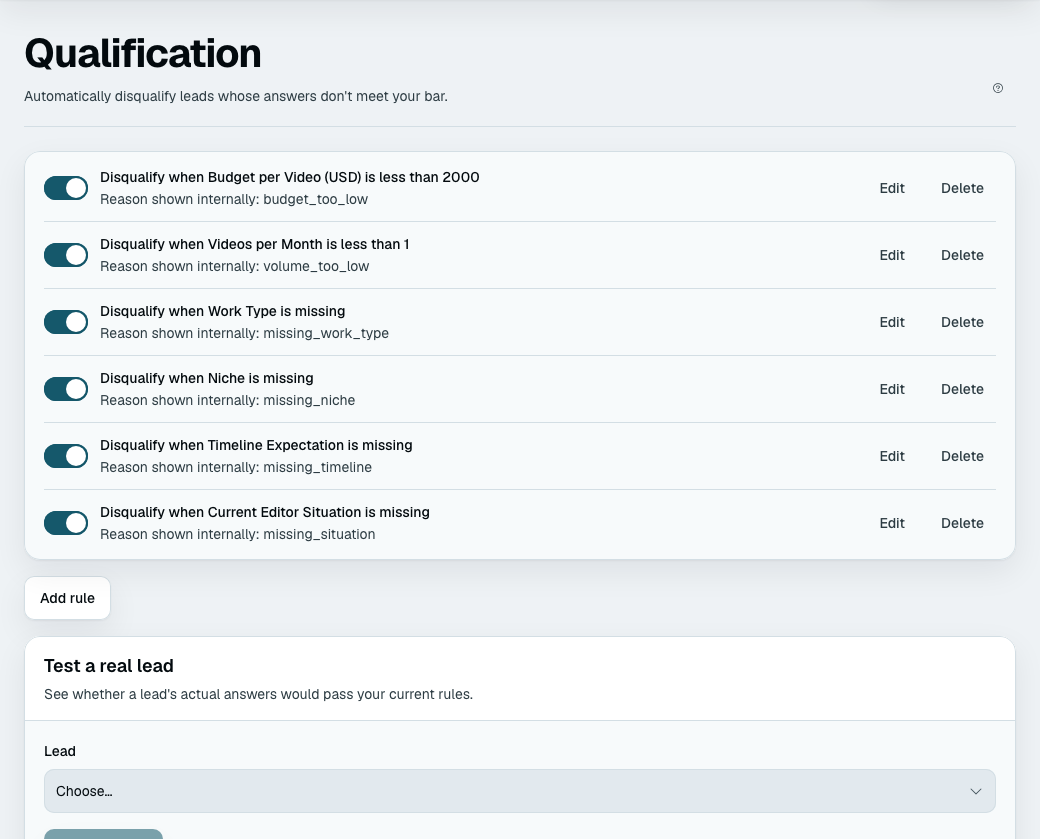
Play a lead who misses one rule, then two, and read what comes back. It is the only way to see the conversation in the context the customer sees it in, and it takes a minute (the playground). The side panel shows the verdict as it would stand if the lead stopped there. Beside the rules, What a lead would hear shows the conversation for the rule you are working on, and once you have a real lead, Test a real lead checks that one lead's actual answers against your current rules.
What a lead marked Lost is
Recorded, kept, and visible on your leads list with its reason and every answer. Nothing is deleted. If your rules turn out to be too tight, the leads you marked Lost are still there to prove it, and your analytics show them grouped by reason.